Statutory Sick Pay Guide
Entering Sick Days
Whenever an employee is off sick from work you should enter this onto the system by following the steps below:
- Click on the employee's name.
- Click on the 'Statutory Pay' tab.
- Set 'Add Statutory Sick Pay to Wages' to Yes unless you work out their sick pay another way, for example, by paying full wages.
- Under 'List of Sick Periods' enter the first full day that the employee was sick.
- Enter the last full day of their sickness. If the sickness is ongoing, leave this blank until they have returned to work.
- Click 'Add', you will then see the Average Earnings for this period. The SSP amount at this point will still show as 0.00.
Paying an Employee with SSP
Begin the pay run as normal by clicking on 'Pay Employees' and then on 'Start New Pay Run'.
Set the salary and other figures to reflect the days which the employee worked.
Next, click on the 'Sick Pay' button and you will see the following screen.
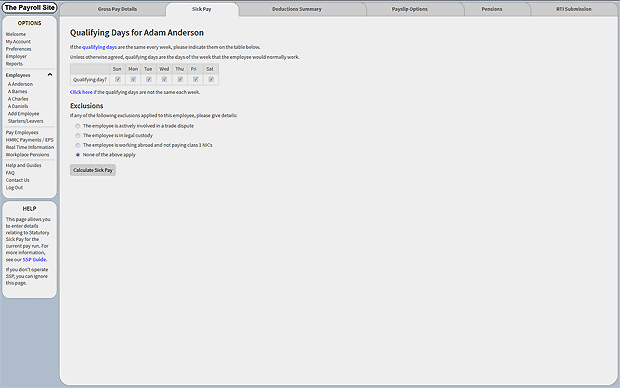
Select the qualifying days: unless otherwise agreed, these are the days the employee normally works. If, for example, the employee normally works Monday to Friday you should untick Saturday and Sunday.
If the employee does not follow a set working pattern then click where indicated, underneath the grid. You should then untick all of the days that are not normally worked. Underneath the qualifying days you are asked if any exclusions apply. Please click on the relevant option and enter the date the exclusion applies where prompted. If there are no exclusions then leave as 'None of the above apply'.
Click the 'Calculate Sick Pay' button.
You will then be shown how the SSP is worked out and the amount.
You can now click 'Calculate Deductions' and proceed as normal.
Remember you must enter the dates of sickness prior to paying the employee.If the system shows that no SSP is due then please see the 'Who Is Entitled to SSP' section below for possible reasons.
Who Is Entitled to SSP?
Statutory Sick Pay is normally paid to employees who are unable to work because of illness and who meet the criteria below:
- The employee must be sick for a minimum of 4 days. All days (not just scheduled work days) count towards a PIW (Period of incapacity to work)
- Their earnings must be at least as much as the Lower Earnings Limit for National Insurance Contributions (NICs)
- The employee must have notified you of their sickness- either within your own set time limit or within seven days
- They have not already received the maximum amount of SSP
If your employee is not entitled to SSP then you should complete an SSP1 form and give it to the employee, as they may be able to claim a social security benefit.